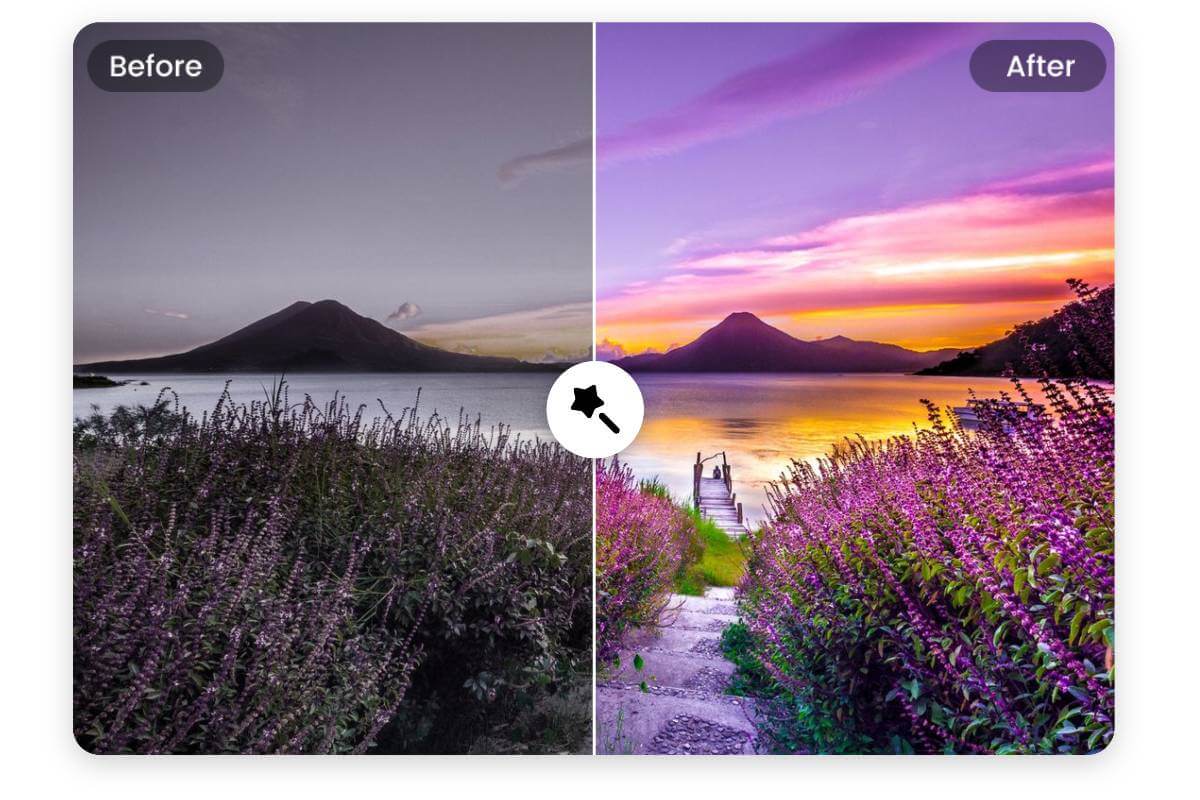
As of October 2025, AI-powered editing has moved far beyond simple filters or auto-enhance tools. Today’s creators, marketers, and photographers expect an image editor that can intelligently interpret content, understand context, and deliver professional-level results instantly. After testing dozens of platforms, I can confidently say that this AI image editor stands out for its intelligent automation, creator-friendly interface, and deep customization capabilities.
At a Glance: Why This AI Image Editor Leads the Pack
| Feature | Description | Best For | Free Plan | Platform |
| Smart Retouching | Automatically removes blemishes, background noise, or artifacts with pixel-level precision | Photographers, eCommerce creators | Yes | Web |
| AI Object Removal | Erases unwanted elements seamlessly and reconstructs the background intelligently | Designers, marketers | Yes | Web |
| Background Replacement | Instantly swaps any background with context-aware lighting and depth | Content creators, advertisers | Yes | Web |
| Style Transfer | Recreates the look of famous art styles or moods using neural networks | Artists, digital creators | Limited | Web |
| Batch Processing | Applies edits to multiple photos at once using consistent AI filters | Agencies, brands | Yes | Web |
1. Smart Retouching and Restoration
The AI retouching system analyzes every pixel to detect blemishes, lighting inconsistencies, or visual noise, then automatically enhances the subject while preserving texture. It doesn’t oversoften or distort details — a common issue in older editors. This makes it especially valuable for fashion, portrait, and eCommerce photography where authenticity matters.
Among the most versatile tools available, this AI image editor from MagicHour.ai helps creators achieve realistic enhancements that balance clarity with artistic control.
Pros:
- Natural-looking results without over-filtering
- Preserves fine details like skin texture or fabric weave
- Works automatically with optional manual fine-tuning
Cons:
- Heavy batch edits can take longer on slower systems
- Occasional color inconsistencies in extreme lighting conditions
2. AI Object Removal
One of the most powerful time-savers, this feature allows users to highlight an unwanted element — whether it’s a person, sign, or random object — and let the AI reconstruct the background. The fill technology mimics the surrounding lighting and textures, creating a seamless finish.
Pros:
- Clean, professional results in seconds
- No need for Photoshop-level skills
- Ideal for product photography and real estate
Cons:
- May require manual touch-ups in complex backgrounds
- Limited accuracy in extremely crowded scenes
3. Background Replacement
This tool understands lighting, perspective, and depth when swapping backgrounds. Unlike older green-screen-style tools, it matches tones automatically and adjusts shadows to look authentic.
Pros:
- Context-aware background adjustments
- Adds dynamic lighting consistency
- Useful for marketing visuals and portraits
Cons:
- Limited template library in the free version
- Complex hair or edge details may require cleanup
4. Artistic Style Transfer
With AI-driven neural filters, users can turn any photo into a stylized piece inspired by famous art movements — from Van Gogh’s brushwork to modern cinematic tones. This helps digital creators experiment without external editing software.
Pros:
- Broad variety of preset artistic styles
- Adjustable intensity levels
- Fun for social and portfolio use
Cons:
- Some styles may distort facial proportions
- Processing time varies depending on image size
5. Batch Processing and Automation
For teams managing large volumes of images, batch processing is a game-changer. You can apply a preset or custom AI workflow to hundreds of images simultaneously, ensuring consistent results across a campaign or collection.
Pros:
- Saves hours of repetitive manual work
- Consistent look and tone across photos
- Integrates well with eCommerce and marketing workflows
Cons:
- Requires solid internet speed for cloud processing
- Custom batch presets can be resource-intensive
How I Tested This Editor
I ran side-by-side comparisons with other AI tools, including Fotor, Pixlr, and Adobe Firefly, using the same set of portrait and product images. The evaluation criteria included:
- Accuracy of retouching and color correction
- Speed of AI processing
- UI/UX simplicity for non-professionals
- Ability to maintain realism under heavy edits
This AI image editor consistently performed at the top in precision and automation quality while maintaining ease of use.
Market Trends: Where AI Editing Is Heading
The next generation of AI editors is moving toward context-aware creativity — understanding what the subject is and how to enhance it meaningfully. We’re also seeing integration with multi-modal AI that combines text, image, and video editing in one interface. MagicHour.ai’s ecosystem is an early example of this, enabling creators to edit, animate, and generate visuals across media formats from a single platform.
Final Takeaway
If you’re looking for an intuitive yet professional-grade image editor that saves hours while maintaining artistic control, this AI image editor delivers. It brings together automation and precision, allowing creators of all levels to achieve studio-quality visuals in minutes.
FAQ
1. Does this AI image editor work on mobile devices?
Yes, it’s fully web-based and optimized for both desktop and mobile browsers.
2. Is it free to use?
A free plan is available with generous credits per month and optional premium upgrades.
3. Can I use it for commercial projects?
Absolutely. The tool supports commercial usage rights, including content for ads, eCommerce, and social campaigns.
4. How accurate is the AI in retouching complex photos?
In most cases, it performs at near-professional levels, though challenging lighting or background patterns may need light manual refinement.
5. Does it support integration with other creative tools?
Yes, you can export outputs compatible with Photoshop, Canva, and Figma workflows.