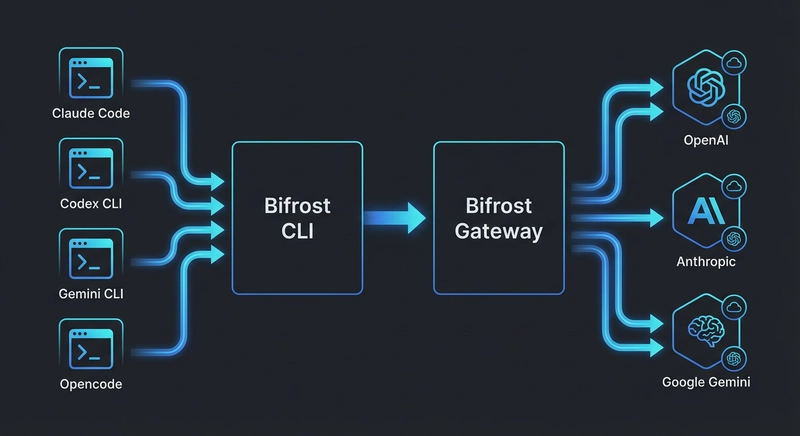
Google’s Gemini CLI has quickly become a popular terminal-based coding agent, known for its strong reasoning abilities and seamless integration with the Google ecosystem. However, most production engineering teams do not operate within a single provider’s ecosystem. Different parts of a codebase often require different models: a reasoning-focused model for system design, a low-latency model for iterative lint-and-fix cycles, and a cost-effective option for generating boilerplate. By default, Gemini CLI only connects to Google’s own API.
Bifrost removes this limitation. As a high-performance, open-source AI gateway, it converts Gemini CLI’s GenAI API requests into the native formats required by other providers. Setup is handled entirely through the Bifrost CLI, an interactive tool that eliminates manual configuration.
The Multi-Provider Challenge in Terminal Coding Agents
Modern engineering teams typically manage API keys across several LLM providers. One team might rely on Anthropic for code reviews, OpenAI for documentation, and a Groq-hosted open-source model for fast debugging cycles. Each provider introduces its own authentication method, SDK, and API structure.
Terminal-based agents like Gemini CLI add another layer of complexity. They are built around a single provider’s API, so switching providers often means reconfiguring environment variables, updating authentication, and ensuring compatibility with required features like tool calling. While this may be manageable for an individual developer, it becomes a significant operational hurdle for larger teams that need consistent access, centralized governance, and visibility into usage.
Bifrost solves this by acting as a unified translation layer. It accepts requests in Google’s GenAI format and routes them to any configured provider, handling format conversion, authentication, automatic failover, and load balancing behind the scenes. The gateway adds only 11 microseconds of overhead at a sustained throughput of 5,000 requests per second, making its impact on interactive workflows effectively negligible.
Connecting Gemini CLI to Bifrost
The setup process takes about 90 seconds and requires two terminal sessions.
Start the Bifrost gateway:
npx -y @maximhq/bifrost
This launches the gateway at http://localhost:8080 and includes a built-in web UI for configuring providers and monitoring traffic in real time.
Start Bifrost CLI in another terminal:
npx -y @maximhq/bifrost-cli
The CLI walks you through four prompts:
- Gateway URL: Confirm or modify the endpoint, which defaults to http://localhost:8080.
- Virtual key: Optionally provide a Bifrost virtual key for authentication and governance. It is securely stored in the OS keyring instead of being written to disk.
- Agent selection: Choose Gemini CLI from the available agents. If it is not installed, the CLI can install it automatically using npm install -g @google/gemini-cli.
- Model selection: Browse and select any model available through your configured providers, not just Google models.
Once complete, Gemini CLI launches with the correct GOOGLE_GEMINI_BASE_URL, API key, and model configuration already applied. No manual environment setup is required.
Using Non-Google Models with Gemini CLI
Bifrost translates Gemini CLI requests into the appropriate format for each provider. As a result, any model connected to the gateway can be accessed using the provider/model-name format with the -m flag:
- Anthropic: gemini -m anthropic/claude-sonnet-4-5-20250929
- OpenAI: gemini -m openai/gpt-5
- Groq: gemini -m groq/llama-3.3-70b-versatile
- Mistral: gemini -m mistral/mistral-large-latest
- xAI: gemini -m xai/grok-3
- Ollama (self-hosted): gemini -m ollama/llama3
Bifrost offers access to 1000+ models across 20+ providers, including Azure, AWS Bedrock, Google Vertex, Cerebras, Cohere, Perplexity, Nebius, Replicate, vLLM, and SGL.
One important requirement is that the selected model must support tool usage. Gemini CLI depends on function calling for tasks like file editing, executing commands, and interacting with the terminal. Models without tool support will not function correctly in this setup.
Routing Through Vertex AI for Enterprise Use
Teams using Google Cloud’s Vertex AI to run Gemini models can still route requests through Bifrost. This enables access to Bifrost’s governance, observability, and failover capabilities without changing the underlying cloud infrastructure.
To enable this, follow the Vertex AI configuration and set GOOGLE_GENAI_USE_VERTEXAI=true along with the Bifrost base URL. Bifrost manages authentication and project routing automatically. For organizations with strict data residency needs, in-VPC deployment ensures all traffic remains inside the private network.
This setup is especially useful in regulated environments. Bifrost can operate a VPC, integrate with secret management systems through vault integrations, and enforce compliance using audit logs that meet SOC 2, HIPAA, and GDPR requirements.
Managing Parallel Sessions with Tabbed CLI
Bifrost CLI continues running after launching a Gemini CLI session and provides a tabbed terminal interface for managing multiple sessions.
Each tab shows a live status indicator, whether active, idle, or flagged with an alert. Press Ctrl+B to enter tab mode and use these shortcuts:
- n to create a new session in a separate tab
- h and l to switch between tabs
- 1 through 9 to jump to a specific tab
- x to close the current tab
This allows developers to run multiple workflows in parallel. For example, one tab can handle a complex refactor using Gemini 2.5 Pro, while another runs a faster model like groq/llama-3.3-70b-versatile for generating tests. Each session operates independently with its own routing and token usage.
Governance, Cost Control, and Observability
As Gemini CLI usage scales, teams need better control over costs and visibility into how models are being used. Bifrost provides a governance layer to address this.
- Per-developer budgets: Virtual keys assign unique credentials with limits on spending, rate, and model access. For instance, senior developers might access premium models, while interns are restricted to lower-cost options.
- Hierarchical rate limits: Budget and rate limit controls apply across individuals, teams, and the entire organization.
- Real-time observability: Every request generates Prometheus metrics and OpenTelemetry traces, enabling monitoring through tools like Grafana, Datadog, or New Relic.
- Semantic caching: With semantic caching, repeated or similar prompts can return cached responses, reducing both cost and latency.
High Availability with Automatic Failover
Interruptions caused by provider outages can disrupt development workflows. Bifrost’s fallback system ensures continuity by rerouting requests to backup providers when needed.
For example, a team might configure Gemini 2.5 Pro as the primary model and Claude Sonnet as a fallback. If the primary provider fails or hits rate limits, Bifrost automatically switches to the backup. The transition happens without interrupting the developer’s session, and the event is logged for later analysis. Enterprise deployments can extend this further with adaptive load balancing, distributing traffic proactively based on real-time system health.
Getting Started
Bifrost is open source on GitHub and can connect Gemini CLI to any provider with just two commands. For teams that need advanced governance, adaptive failover, and VPC-isolated deployments, you can book a Bifrost demo to explore how it fits your workflow.
Stay in touch to get more updates & news on Daily!