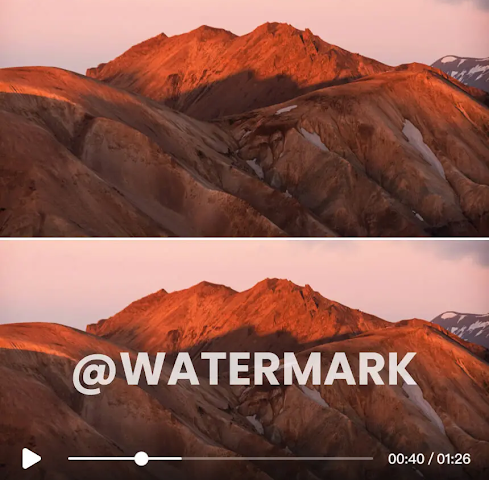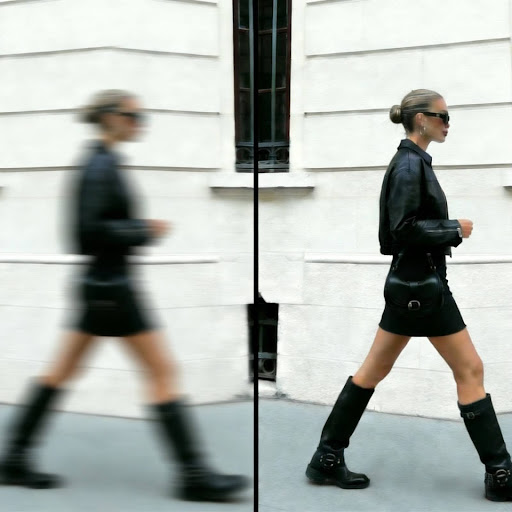
Low-resolution product photos can seriously hurt your online store’s credibility and sales. When customers can’t zoom in to see product details clearly, they lose trust and are more likely to abandon their cart. The good news is you don’t need expensive reshoots to fix this problem. AI image upscalers use advanced algorithms to increase photo resolution, remove artifacts, and create stunning, print-ready assets from small, pixelated source files. This guide ranks the best tools available today.
Top 1: ImgUpscaler AI
Overview
ImgUpscaler AI is a powerful and user-friendly tool designed specifically to enhance and enlarge images without sacrificing quality. It leverages sophisticated AI models trained on millions of images to produce sharp, clean, and detailed results. This platform is an excellent choice for ecommerce businesses that need to process images quickly and efficiently. The core function is a web-based Image Upscaler that supports batch processing, allowing you to upload and enhance multiple product photos at once.
Beyond simple enlargement, ImgUpscaler offers a comprehensive suite of tools. You can make detailed adjustments and creative enhancements with its integrated AI Photo Editor, making it a versatile solution for all your product photography needs. The technology excels at adding detail back into compressed images, correcting colors, and removing compression noise, resulting in professional-grade photos ready for any online marketplace.
Key Features
* Batch Processing: Upload and upscale multiple images simultaneously, saving significant time for large product catalogs.
* Up to 4K Resolution: Enlarge small or old photos to high-resolution 4K quality suitable for large displays and print.
* AI-Powered Enhancement: The tool automatically reduces noise and sharpens details for a crisp, professional finish.
* Multiple AI Models: Utilizes different AI algorithms optimized for various image types, including product photos, portraits, and digital art.
Pros & Cons
* Pros: Very easy to use with a simple drag-and-drop interface. Fast processing speeds, even with batch uploads. Generous free trial to test the capabilities.
* Cons: The free version has limitations on the number of images and maximum resolution. Advanced editing features are part of the paid plans.
Best For
Ecommerce store owners, digital marketers, and content creators who need a fast and reliable way to upscale and enhance product photos in bulk.
Top 2: VanceAI Image Upscaler
Overview
VanceAI is another popular name in the AI image enhancement space, offering a robust upscaler that promises to enlarge images by up to 800% without quality loss. It uses deep learning to intelligently fill in missing pixels, sharpen edges, and reduce blur. The platform is designed to be intuitive, making advanced photo enhancement accessible to users without any technical expertise in photo editing.
The tool provides specialized AI models tailored for different needs, such as enlarging photos, enhancing anime art, or de-noising images. This specialization ensures that you get optimized results based on your specific image type. VanceAI is a strong contender for those looking for more than just a simple upscaler, as its suite includes tools for sharpening, colorizing, and retouching.
Key Features
* 8x Upscaling: Increase image resolution by up to 800% for massive enlargements.
* Specialized AI Models: Choose from different algorithms designed for photos, art, and text-based images.
* Noise and Blur Reduction: The AI effectively cleans up grainy and blurry photos during the upscaling process.
* Cloud and Desktop Versions: Offers the flexibility of a web-based tool or a downloadable desktop application for offline use.
Pros & Cons
* Pros: Impressive enlargement capabilities. Provides a full suite of AI photo editing tools. Offers both online and offline software options.
* Cons: The free plan is quite limited, offering only a few credits to start. The user interface can feel cluttered with all the different tool options.
Best For
Photographers and designers who need to upscale images to very large sizes and want access to a wide range of AI enhancement tools.
Top 3: Upscale.media
Overview
Upscale.media is a straightforward and highly effective tool focused solely on one task: upscaling images. Developed by the team behind Remove.bg, this tool emphasizes simplicity and speed. It allows you to increase image resolution by up to 4x automatically. You simply upload your photo, and the AI takes care of the rest, delivering a higher-resolution version in seconds.
The platform is perfect for quick, on-the-fly enhancements. It also includes an “Enhance Quality” feature, which is an AI-driven process that improves colors, textures, and lighting. This makes it a great two-in-one tool for users who want to upscale and refine their images without navigating complex software.
Key Features
* Simple Interface: Extremely easy to use with a clean, drag-and-drop workflow.
* Up to 4x Upscaling: Quickly increases image dimensions while preserving detail.
* Automatic Quality Enhancement: An optional toggle allows the AI to automatically improve image quality by balancing color and lighting.
* Mobile Apps: Available as a dedicated app for both Android and iOS devices for convenient mobile editing.
Pros & Cons
* Pros: Incredibly fast and simple. No registration is required for single image upscales. Mobile apps make it convenient for editing on the go.
* Cons: Limited to 4x enlargement, which may not be enough for all use cases. Lacks batch processing features found in other tools.
Best For
Social media managers, bloggers, and anyone needing a quick and easy tool to upscale images for web content without any complexity.
Top 4: Icons8 Smart Upscaler
Overview
The Icons8 Smart Upscaler is part of a larger ecosystem of creative tools, but it stands strong on its own as a powerful image enlarger. It is fully automated and uses machine learning to upscale and enhance images without turning them blurry. The tool is known for its ability to handle fine details and textures, making it a reliable choice for intricate product photos or detailed digital graphics.
This upscaler can increase image resolution up to 4x or 8x, depending on the plan. One of its standout features is its API access, which allows developers to integrate the upscaling technology directly into their own applications or workflows. This makes it a flexible option for businesses with custom software needs.
Key Features
* High-Quality Results: The AI is well-trained to preserve details and reduce artifacts effectively.
* API Access: Offers an API for developers to integrate the service into their own projects.
* History Feature: Keeps a log of your recently upscaled images for easy access and re-downloading.
* Integrated with Creative Suite: Works seamlessly with other Icons8 tools like background removers and stock photos.
Pros & Cons
* Pros: Produces very clean and sharp results. API access is a huge plus for businesses. The integrated library of creative assets is a nice bonus.
* Cons: The free version places a watermark on images. Batch processing is only available in paid plans.
Best For
Web developers, agencies, and businesses that need to integrate AI upscaling into their existing workflows via API.
Top 5: Bigjpg
Overview
Bigjpg is an image upscaler that specializes in enlarging anime-style illustrations and digital art, but it works surprisingly well for standard photos too. It uses Deep Convolutional Neural Networks to intelligently reduce noise and serration in images, which is particularly useful for cleaning up heavily compressed JPEGs before enlarging them.
The tool offers both free and paid versions, with the free service allowing upscaling up to 4x. One of its key differentiators is its handling of noise reduction. It analyzes the image and provides an optimal level of de-noising to ensure the final result is clean without looking overly processed. While its user interface isn’t as polished as others, its performance is consistent and reliable.
Key Features
* Specialized for Artwork: Excellent at upscaling illustrations, cartoons, and anime art without creating artifacts.
* Noise Reduction Control: Intelligently reduces noise and compression artifacts for cleaner results.
* Supports Large Files: The paid version can handle images up to 50 MB in size.
* Stable Processing: Keeps a record of your work, so if your browser crashes, you can resume the process.
Pros & Cons
* Pros: Outstanding performance on digital art and illustrations. The free version is quite capable for casual use. Stable and reliable processing.
* Cons: The user interface looks dated compared to competitors. Processing can be slower than other tools, especially for free users.
Best For
Digital artists, graphic designers, and anyone who needs to upscale anime, illustrations, or other forms of digital art with high fidelity.
Comparison Summary
To help you choose the right tool, here is a side-by-side comparison of the key features offered by each AI image upscaler.
| Feature | ImgUpscaler AI | VanceAI | Upscale.media | Icons8 Smart Upscaler | Bigjpg |
| Max Upscale | 4K | 8x | 4x | 8x | 16x (Paid) |
| Batch Processing | Yes | Yes (Paid) | No | Yes (Paid) | Yes (Paid) |
| Free Version | Yes | Yes (Limited) | Yes | Yes (Watermarked) | Yes |
| API Access | No | Yes | Yes | Yes | Yes |
| Best Feature | Batch processing | Specialized models | Simplicity & speed | API integration | Artwork upscaling |
Final Recommendation
Choosing the best AI image upscaler depends entirely on your specific needs. Each tool offers a unique strength that makes it suitable for different types of users.
For ecommerce store owners who need to process hundreds of product photos efficiently, ImgUpscaler AI is the top choice. Its powerful batch processing and excellent 4K results provide the best combination of quality and speed for business use.
If you are a photographer or designer who needs maximum enlargement power and a full suite of editing tools, VanceAI is an excellent option. For those who value speed and simplicity above all else, Upscale.media delivers fantastic results with zero learning curve. Finally, for digital artists and illustrators, Bigjpg offers specialized algorithms that preserve the unique qualities of digital art better than anyone else.
Stay in touch to get more updates & news on Daily!